
Calendar & communication
Meetings, inbox, scheduling changes, travel, and the information surrounding them.
Executive Assistant and AI Architect for Founders and Entrepreneurs
As the company grew, more work started coming back through you. Your Executive Assistant and AI Architect takes ownership of the work surrounding your role and keeps it moving.
Private ConsultationThe role
Your Executive Assistant and AI Architect works around your responsibilities as founder, from the work happening today to the systems behind it.
The work around you
Meetings, inbox, scheduling changes, travel, and the information surrounding them.
Clients, candidates, investors, introductions, and follow-up.
Deadlines, documents, vendors, open commitments, and internal coordination.
The business and personal logistics that affect your working day.
An investor call moves from Thursday to Friday. Your EA adjusts the calendar, moves the prep block, confirms everyone involved, and makes sure the relevant documents move with it.
The systems behind the work
Transcripts can become decisions, assigned follow-up, and material for the next brief.
Approved SOPs and company documents can become a searchable internal knowledge source.
Repeatable information can be captured, structured, and moved to the right person or system.
Small tools and automations can remove manual steps the team keeps repeating.
A call transcript can become decisions, assigned follow-up, and the next meeting brief without someone rebuilding the information from scratch.
Where work keeps coming back to you
A client asks for an update. Someone forwards a contract. A vendor needs an answer. You are still reading each message to decide who owns it and what happens next.
Your team can do the work. Questions still stop when something falls outside the usual process, then collect across Slack, email, text, and meetings.
The call ends. The documents, CRM update, next meeting, assigned actions, and client follow-up still need someone to own them.
A voice note in the car, an introduction you promised, or a thought between meetings still needs somewhere reliable to land.
Preparation, travel, transition time, documents, decisions, and follow-up all sit around the meeting itself.
If this is where your day keeps getting pulled apart, we can map what should move first.
Book a Private ConsultationWhat your Executive Assistant owns
The role is built around the work that currently reaches you and the authority your EA can carry once the context is clear.
Executive Office
Tomorrow’s client meeting moves by two hours. Your EA handles the calendar chain, updates the people affected, moves the prep block, and protects the travel window.
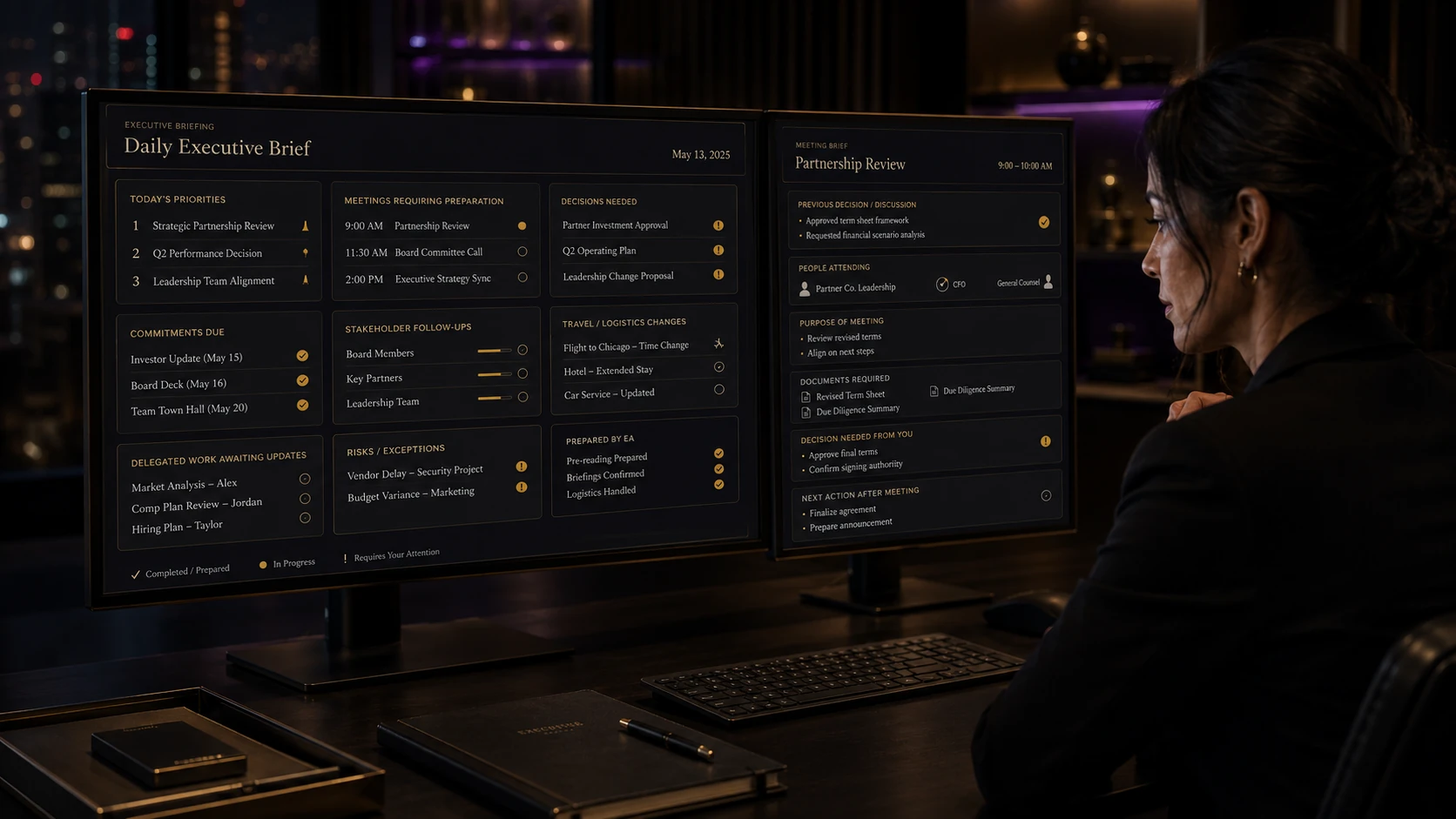
The morning brief
Your EA has already checked the calendar, inbox, Slack, outstanding follow-up, meeting preparation, and anything waiting on another person.
9:00 Investor call
12:00 Leadership meeting
3:15 Candidate review
Approve revised client proposal before 10:30.
Choose the final candidate interview time.
Client meeting moved. Travel window adjusted. CRM notes entered. Vendor follow-up sent. Friday agenda prepared.
A day inside the role
Messages are reviewed, routine items move, and the one decision that needs you goes into the brief.
Previous context, open commitments, and the relevant material are together before you enter the meeting.
Requested information moves, the CRM is updated, and the next conversation gets a date.
Notes, contact updates, decisions, and new commitments are entered where the team can find them.
The action is captured, clarified where needed, assigned, and placed into the right project or system.
The next day’s meetings, unresolved items, and preparation are checked before you sign off.
Meeting anatomy
Your EA gathers the context around the conversation before it starts. The documents are there, the people are confirmed, and unresolved items from the last meeting come forward.
Important decisions and commitments are captured while the context is current, so the follow-up does not depend on someone reconstructing the meeting later.
The meeting ends. Your EA handles what it created and keeps the open items visible until they close.
Business and personal
A flight moves and Thursday’s investor meeting has to move with it. A family commitment changes an afternoon that already has three calls booked. The person responsible for your calendar needs enough context to see those collisions before they reach you.
They compete for the same hours.
Where the AI Architect fits
Your Executive Assistant and AI Architect looks for repeatable work that can be captured, structured, routed, or made easier to use.
Inputs
The work starts with information the company already creates. The AI layer should know what it is allowed to use and where the finished work belongs.
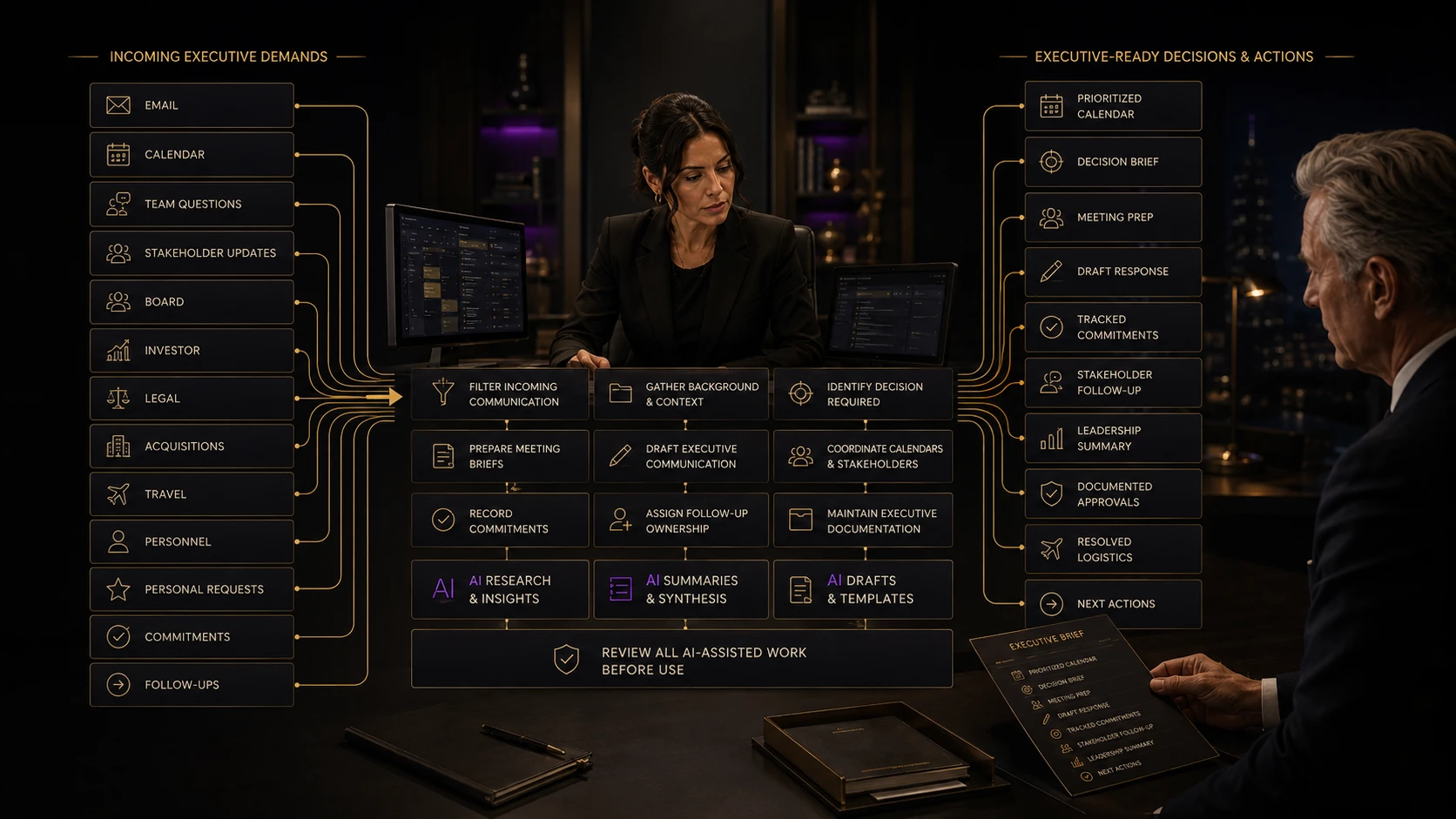
Bring the tools and recurring work your team already uses. We can review where AI belongs inside the EA’s role.
Review Your SetupQuestions
A founder’s Executive Assistant manages the work surrounding the founder’s role. That can include calendar and inbox management, meeting preparation, follow-up, hiring coordination, CRM updates, client communication, travel, documentation, team requests, and projects that otherwise keep returning to the founder.
At GoToCalls, Executive Assistant and AI Architect is one role. The Executive Assistant owns the day-to-day work around the founder. The AI Architect builds useful AI-assisted processes, internal tools, documentation, prompts, automations, and knowledge systems inside the work the company already does.
Yes. Appropriate personal logistics can sit alongside business support when they affect the founder’s working day. That may include travel, reservations, appointments, family commitments, household coordination, and other calendar-dependent responsibilities.
Yes. The work can include inbox triage, drafting routine replies, routing messages, scheduling, rescheduling, protecting preparation time, coordinating travel, and keeping the information surrounding meetings together.
The AI Architect looks for repeatable work that can be handled better with AI or automation. Examples include turning transcripts into follow-up, building meeting briefs from approved sources, creating internal knowledge tools, documenting recurring processes, and routing information between systems.
Yes. The exact systems depend on the client. GoToCalls EAs commonly work inside the communication, calendar, CRM, documentation, and project tools the company already uses, subject to approved access and security requirements.
Yes, when the operating load and access are workable. The EA can maintain separate calendars, contacts, projects, documents, and recurring responsibilities across multiple companies or investments while keeping each entity’s information organized.
GoToCalls places an Executive Assistant and AI Architect around the founder’s operating work. The role carries context across meetings, communication, follow-up, projects, documentation, and systems instead of waiting for a list of isolated tasks.
Private consultation
We will review the responsibilities currently sitting with you, where work slows down, and what an Executive Assistant and AI Architect could own inside the way your company already operates.
Request a Private Consultation